iOS + macOS source

Every Claude Code session, on your phone

Four sessions running on your Mac, four cards in your pocket. See what each one is doing, answer the one that is stuck, and start new work from anywhere. You get the source for both halves, and your own Claude Code installs it.

Launch price $29 until 9 August 2026, then $59. One payment, and the download link appears the moment you pay.

The TalkShell shells grid on an iPhone: usage arcs around the Dynamic Island, a daily digest summarising four active projects, and one card per Claude Code session showing its latest reply.
your 5-hour and 7-day limits, wrapped round the island
what every project did overnight, in one digest
one card per session, newest reply first
green means working, amber means it needs you
tap to answer without opening the session
the browser, the queue, and a new session

Voice is in there too, and it is the fastest way to answer one of these. It is not the point. The point is that all of it is on the phone.

Setup

Your Claude Code installs it

The repo is written for an agent, not for a human with a checklist. Clone it, say the word, and read the summary it hands back.

$ git clone <your-private-repo> && cd talkshell
$ claude "set up TalkShell"
1

It reads CLAUDE.md

Executable instructions, not prose. Alongside it, talkshell.json holds every path, port, permission and command as JSON, so the agent never guesses.

2

It runs the installer

setup.sh is idempotent. It generates your token and TLS certificate, loads a LaunchAgent, waits for the server, and prints READY, NEEDS_HUMAN or FAILED as its last line.

3

It proves it works

verify.sh exits 0 only when the server answers, TLS is valid, a wrong token is rejected, three endpoints return JSON, and Claude Code is on PATH.

Two steps no script can do, and your agent will say so: the macOS permission dialogs, and putting your Apple team id into the Xcode project. There is also an installable skill at .claude/skills/talkshell-setup/ and an AGENTS.md for agents that are not Claude.

Why source, not an app

Because you can change any part of it

There is no App Store build of TalkShell, and that is the point rather than a shortcoming. You are buying a Claude Code project that happens to be a Claude Code client.

“I wish it did X” stops being a feature request you send me and becomes a sentence you say to your agent.

The repo ships with CLAUDE.md, talkshell.json and an installable skill, so your agent already knows the codebase before you ask it for anything. Each of these is one prompt:

poll fasterOne constant. Drop the 3-second poll to 1 second if your Wi-Fi can take it.
new model appearsAnthropic ships one, you add a card. Renaming Opus 4.8 to Opus 5 and making it the default was a two-line change.
render a tool call your wayAdd a case for the tool you care about and give it its own layout.
a second MacThe host and token are settings. Point a second install at a different machine.
your coloursOne palette enum. Make it look like your terminal instead of mine.
a new endpointAdd it to the server and call it from the app. Both halves are yours.

An App Store build would mean waiting on review for every one of those, and waiting on me to want the same things you want. Nothing here is behind a version bump, a feature flag, or a paid tier. If a change is worth ten minutes to you, make it in ten minutes.

What it costs to run

Nothing, after the $29

No VPS

The server is one Python file on the Mac you already own. There is no host to rent, no container to keep alive, and no bill that grows with use.

No account

Nothing to sign up for. Your phone talks to your Mac over TLS with a token your own machine generated. We never see a request, so there is no service to go down or get acquired.

No subscription

One payment. No renewal, no seat count, no tier above this one, and nothing to cancel. It keeps working whether or not this page still exists.

Away from home does not change that. The included script provisions your own Cloudflare tunnel, which is free at this volume, and the Worker that fronts it runs on Cloudflare's free tier. The only recurring costs anywhere near TalkShell are ones you already pay: your Claude Code subscription, and Apple's $99 a year if you want an install that does not expire.

On the phone

Four screens, straight off the device

Not mockups. This is the app running against a Mac with four Claude Code sessions open, mid-work.

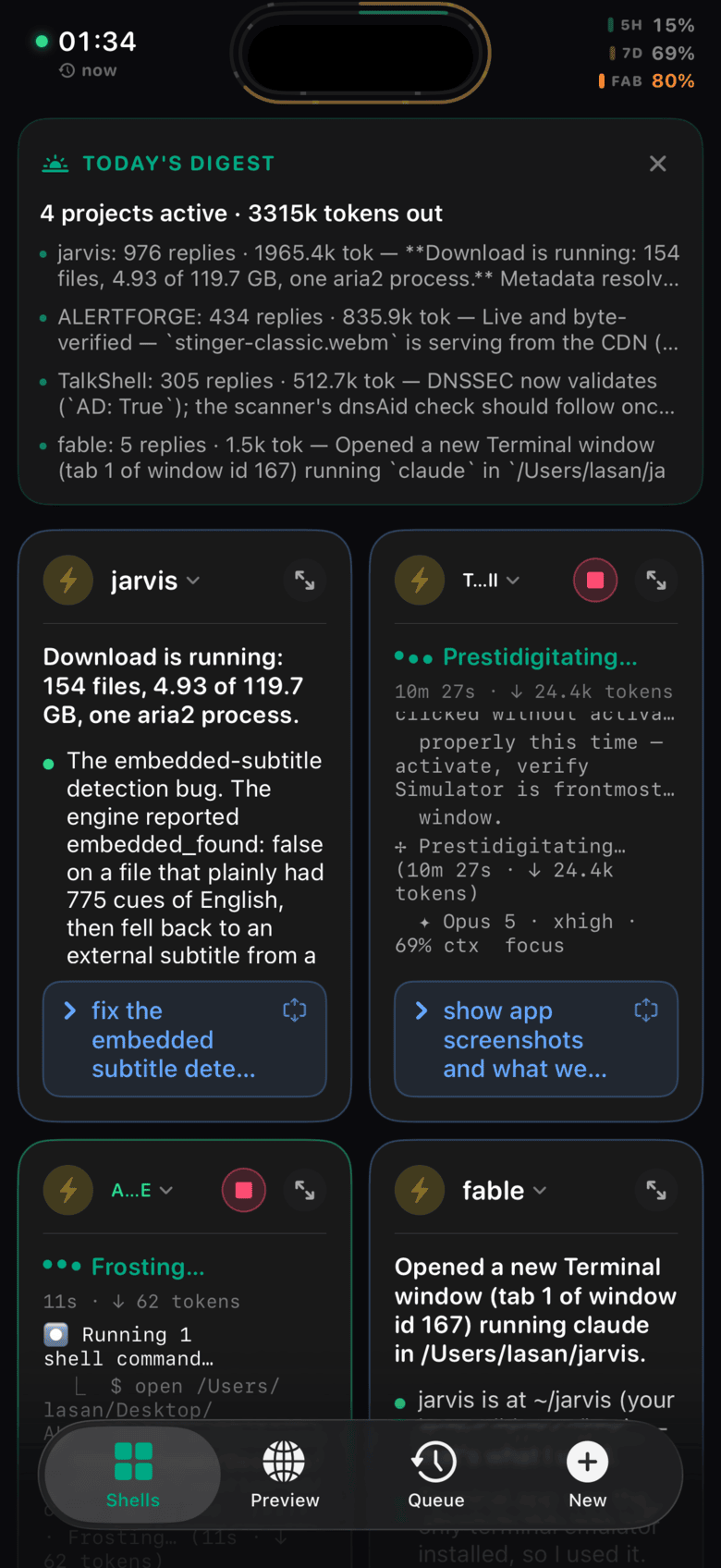
The TalkShell shells grid: a daily digest summarising four active projects, then one card per Claude Code session showing its latest reply, with usage meters in the status bar.
Every session, as a grid. A digest across all projects, then one card per Terminal window with its latest reply and a tap-to-reply shortcut. The meters top right are your 5-hour, 7-day and model limits.
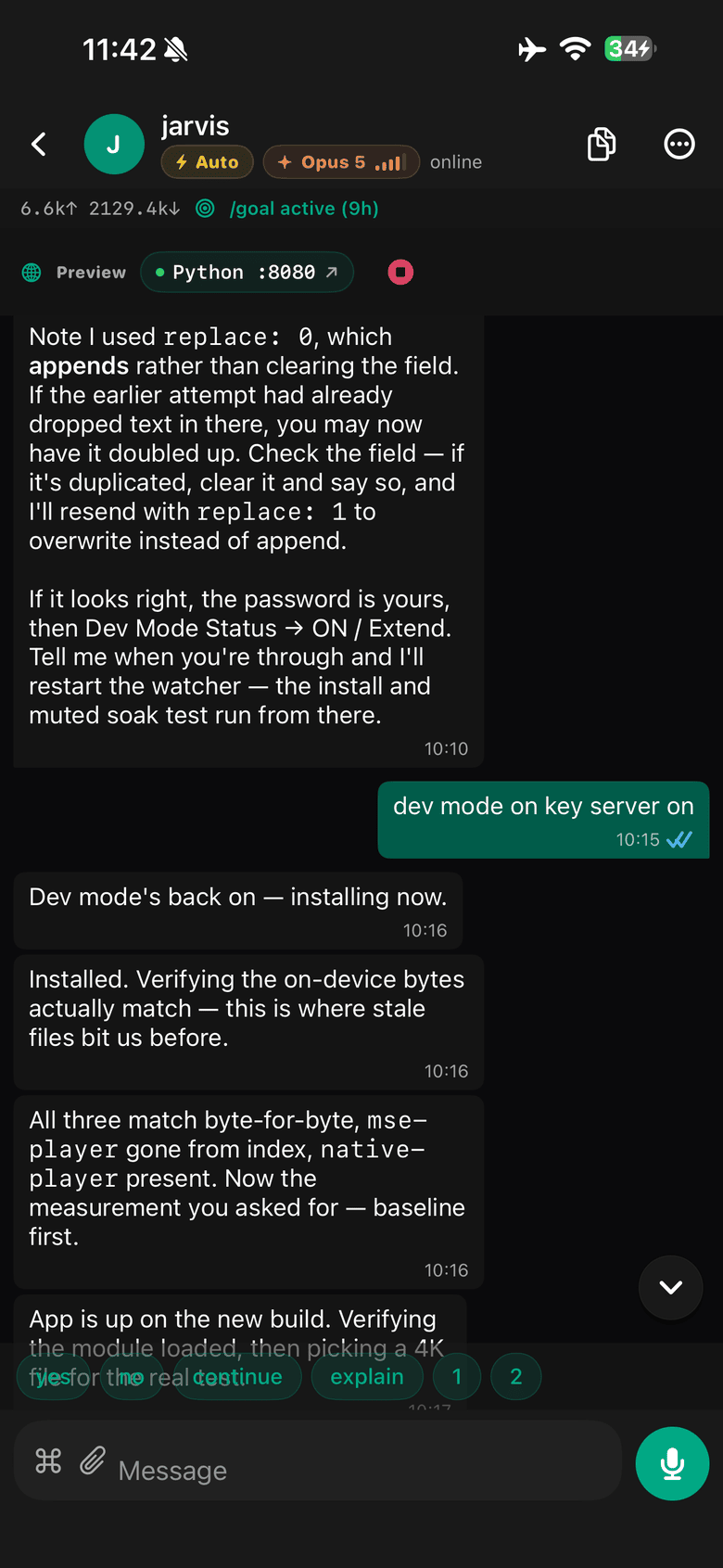
A TalkShell conversation with a session called jarvis: the agent's replies in dark bubbles, the user's reply in green with a read receipt, a header showing Auto mode and an Opus 5 chip with effort bars, token counts, an active goal timer, and a green chip linking to the Python dev server on port 8080. Quick-reply chips and a microphone button sit above the message field.
The same conversation as your Mac. The header carries the mode, the model with its effort bars, tokens in and out, and how long the current goal has been running. The green chip jumps straight to the dev server this session started. Quick replies for the common answers, and the mic is always there.
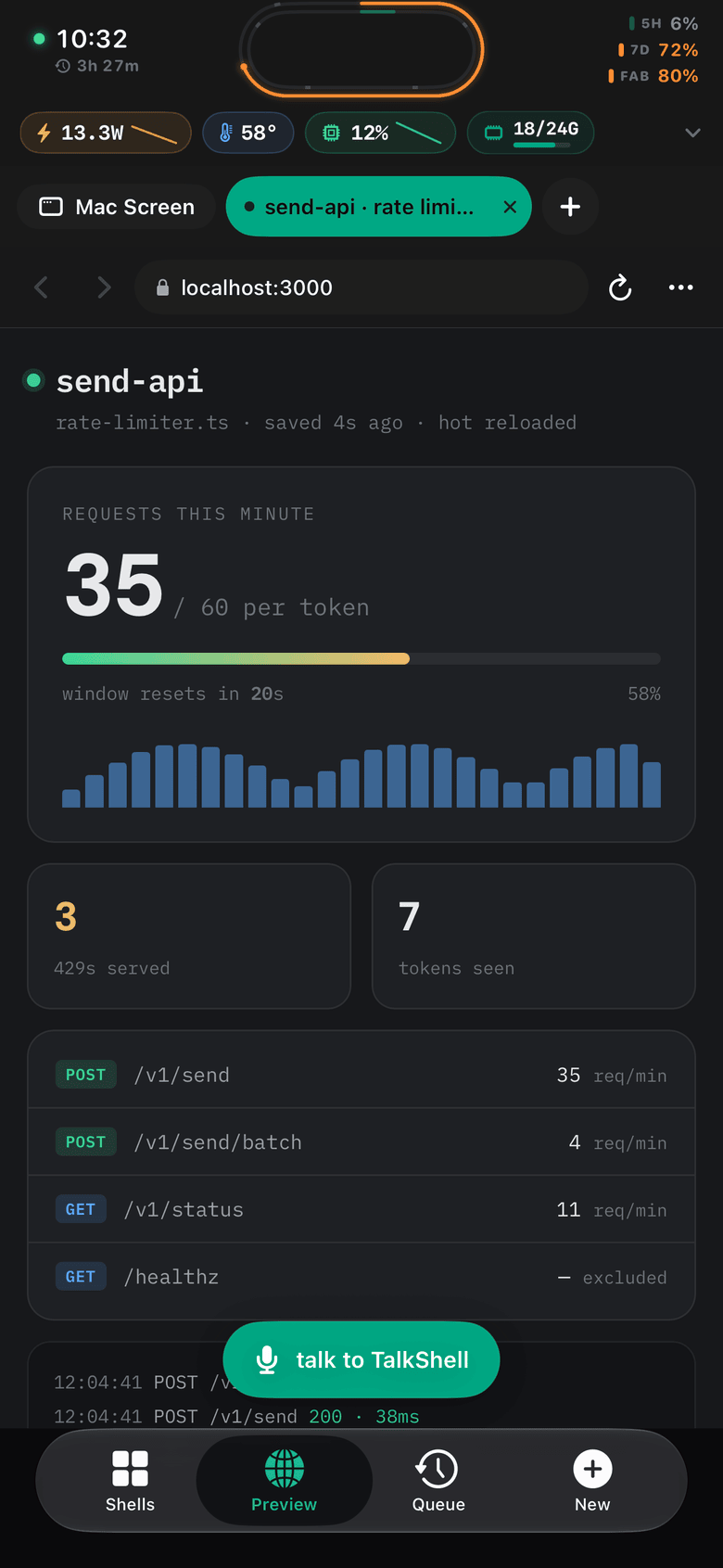
The TalkShell Preview tab showing a dev server on localhost:3000: a rate-limiter dashboard for send-api with a live request counter at 35 of 60 per token, a sparkline, 429 count, and per-endpoint request rates. Above it a Mac vitals strip reads 13.3W, 58 degrees, 12% CPU and 18 of 24 GB, and the tab bar holds Mac Screen alongside the page.
A browser, pointed at your Mac's localhost. This is a dev server on :3000 rendering on the phone, tabs titled from the page like any browser. The strip above reads the Mac's watts, temperature, CPU and memory while the agent works, and the mic stays within reach.
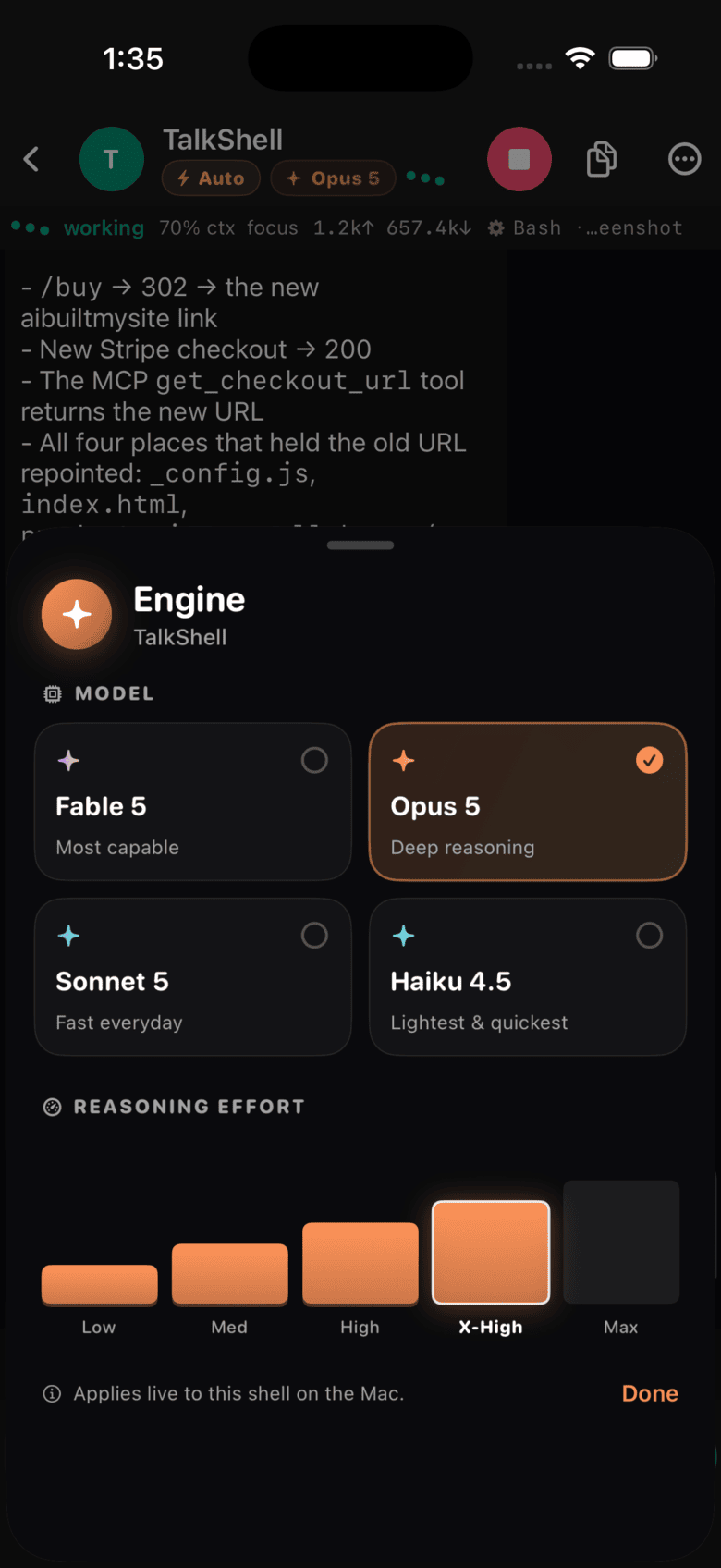
The TalkShell engine picker: cards for Fable 5, Opus 5, Sonnet 5 and Haiku 4.5 with Opus 5 selected, and a five-bar reasoning effort control set to X-High.
Model and effort, in two taps. Applies live to that session on the Mac, the same as typing /model and /effort into its Terminal window.

What it does

A full Claude Code client, not a notifier

Every session already open on your Mac shows up as a card. Tap in and you are in the same conversation, from the phone.

Talk instead of typing

Hold the mic and speak. The phone transcribes live so you can see the words forming, then your Mac produces the final text and sends it. No keyboard on a 6-inch screen.

Watch the tool calls land

Read, Edit, Bash, test output, diffs with line counts. The transcript renders markdown and tables, so a plan or a comparison arrives readable rather than as a wall of text.

Every session, as a grid

One card per Terminal window running Claude Code, each showing the latest reply and whether it is working, waiting on you, or done. Swipe between the grid, the queue, and your chats.

Watch localhost render as it is built

A real browser lives in the app, with tabs that keep their own history and scroll position. Type 3000 or localhost:8787/admin and it loads the dev server on your Mac. It goes through the same authenticated route as everything else, including the tunnel, so you can watch the agent's work appear from a train with no port forwarding and no ngrok. The app lists which ports are listening, and kills one that is stuck.

Mirror and drive the Mac

One tab over from the browser: the Mac's screen at three quality tiers, with tap and keyboard input, for the dialog Claude cannot click for you.

See what it is costing the machine

A vitals strip reads watts, temperature, CPU with a sparkline, and memory used against total, straight off the Mac. Handy when a long run starts cooking a laptop on a desk you are not sitting at.

Switch model and effort

Move a session to opus at xhigh in two taps. The chip in the header shows which model answered and how much of the recent output was thinking.

It tells you when a shell needs you

Claude stops and asks something, and your phone says “jarvis needs you” — the folder name, so you know which session, and a one-line summary of what it is actually asking rather than a generic “needs input”. When a run finishes you get “jarvis — tap to talk”.

Answer from the Lock Screen

The notification carries Claude's real choices as buttons. A yes-or-no question gets Yes and No; a numbered menu gets its first three options; a finished run gets Continue. Press and answer without unlocking or opening anything.

Quiet about everything else

You only get pinged for sessions you started from the phone, so work you are doing at the Mac never buzzes your pocket. It also stays silent about the session already open on your screen. A morning digest summarises what every project did overnight.

Live on the Lock Screen

A Live Activity ticks while the agent works, showing the session, its elapsed time and token count in the Dynamic Island, with a home-screen widget for the same. Your Mac pushes these itself.

Drop a file straight into the shell

Paperclip a screenshot, a photo, a log, a zip. It lands in that session's working directory and the agent can read it immediately. Big attachments get a progress bar and an hour to finish, so a video or an archive over slow Wi-Fi does not time out at thirty seconds like it used to.

Usage arcs wrapped around the Dynamic Island

Two concentric rings hug the island: the inner one is your 5-hour limit with five hour-ticks etched in the track, the outer is your 7-day with seven day-ticks, each with a glowing head at the tip. Pace evenly and the tip rides one tick per hour. Beside it, a countdown to the next reset. Tap it for the pacing detail.

Queue work against the 5-hour reset

Hit your limit mid-thought and the work does not evaporate. Add prompts to the queue and they fire on their own the moment the window rolls over, into the session you picked. Come back to finished work rather than to a blocked shell.

Pull the results back out

Browse everything the agent created or edited this session, per session, and open or share any of it from the phone.
Away from your Wi-Fi

It finds its own way back to your Mac

Leaving the house should not mean losing the session. The app works down a ladder on every poll and tells you which rung it landed on.

1

Your Mac's .local name, over Bonjour

The fast, free path. A 2.5 second probe of /ping decides whether it is alive, using its own throwaway session so a pending decision cannot poison the live one.

2

The last LAN IP that worked

mDNS quietly stops resolving on cellular and on networks that block Bonjour. The app cached the IP from the last successful connect and tries that before giving up on the network.

trying cached LAN IP…

3

Your Cloudflare tunnel

Both LAN routes are dead, so you are somewhere else. The app probes the tunnel and switches to it. This is tried before Wake-on-LAN on purpose: on cellular there is nothing on your network to wake, and waiting would cost you six seconds for nothing.

away from Mac — switched to remote

4

Wake the Mac

Still nothing, and you are on the Mac's Wi-Fi. It is asleep. A magic packet goes out across the subnets it might be on, then a six-second wait and one more try.

waking Mac…

And back home again

While on the tunnel, the app re-probes your LAN once a minute. The moment your Wi-Fi answers it drops back to the fast path on its own.

back on home Wi-Fi — using LAN

What changes on the tunnel

A tunnel is slower and metered, so the app spends less on it without being told to.

On your Wi-Fi
On the tunnel
Polls every 3 seconds
Polls every 8 seconds
Full payloads
lite=1, trimmed payloads
Screen mirror at HD
Screen mirror drops to SD
Wake-on-LAN available
Skipped, nothing local to wake

The tunnel is yours, not ours. mac/setup-remote.sh provisions it, and the included Cloudflare Worker checks a hash of your token at the edge, rate-limits per IP and token, then forwards to the private tunnel hostname with a shared secret. A direct hit on that hostname without the secret gets a 401. Cold starts remember the route you were last on, so relaunching away from home reaches your Mac on the first poll instead of walking the whole ladder again.

What's inside

Both halves, complete

No stubs and no paid tier above this one. You get the system as it runs on my Mac and my phone.

iPhone app

Swift · 26 files · 17,687 lines
  • Hold to talk. The phone transcribes live while you speak, then your Mac produces the final text.
  • Full chat transcript with markdown, tables, and file attachments from your camera roll.
  • Mirror the Mac screen at three quality tiers. Tap it and type into it.
  • Model and effort picker. Move a shell to opus at xhigh in two taps.
  • Live Activities and a widget for what the agent does while you are away from the desk.
  • A queue that fires when your usage limit resets.
  • Session browsing, resume, per-session file lists, usage charts.

Mac server

Python · 7,520 lines · stdlib
  • One file, no pip install. Standard library only, so nothing rots in six months.
  • 38 HTTP endpoints over TLS, behind a token the server generates for you.
  • Drives your real Terminal windows with AppleScript. Your sessions, not a headless clone.
  • Screen capture and synthetic input for the mirror.
  • Push sender for prompts, completions, and limit warnings.
  • A LaunchAgent so the server is up before you are.
  • Cloudflare Tunnel and Worker plus the script that provisions them.

Before you buy

What you need, and what you don't get

You need

  • A Mac that runs Claude Code.
  • Xcode, to build and sign the app.
  • An Apple Developer account at $99 a year for an install that lasts. Free signing works if you re-sign every 7 days.
  • An iPhone on iOS 26, or lower the deployment target yourself.
  • Your own Claude Code subscription. TalkShell drives it and does not replace it.

You don't get

  • An App Store build. You compile it yourself.
  • Support. The README covers setup. Open a GitHub issue and the answer helps whoever asks next.
  • A hosted service. Access from outside your Wi-Fi runs through your own Cloudflare tunnel.
  • Polish. One view file runs past 10,000 lines. You will want to split it up.
  • Resale rights. One developer, no redistribution.

Price

One payment, both halves

Launch price · until 9 August 2026

$29 once

Going to $59 on 9 August 2026. One payment either way, and whatever you pay is the last time you pay.

  • iOS app, widget, and Live Activity sources
  • The Mac server, LaunchAgent, and tunnel scripts
  • Setup README and the App Store notes I wrote
  • Yours to change and ship inside your own work
Get the source

Download link the moment you pay. No subscription, no renewal.

FAQ

Questions I get

Couldn't I build this myself with Claude Code?

You could. I thought the same thing and it took me months. The SwiftUI arrived fast. AppleScript, the TCC prompts, Bonjour on cellular, and Live Activities did not. What you buy here is that second list.

Does my agent really set it up?

Yes, and that is what the repo is built for. CLAUDE.md is executable setup instructions rather than a tutorial, talkshell.json holds every path and command as JSON, setup.sh is idempotent and ends in a machine-readable status line, and verify.sh exits 0 only when the install genuinely works. There is an installable skill in .claude/skills/ and an AGENTS.md for other agents. Your agent stops at the macOS permission dialogs and at Xcode signing, because no script can click those, and it tells you exactly which one it is waiting on.

Do I need a paid Apple Developer account?

For an install that outlives the week, yes, $99 a year. Free signing builds and runs, then the provisioning profile expires after 7 days and you re-sign from Xcode. Plenty of buyers work that way. Know it before you pay.

What am I reading when I clone it?

Swift and SwiftUI on the phone across 26 files, with the widget and Live Activity in their own target. One Python file on the Mac at 7,520 lines, standard library, driving Terminal through AppleScript. No package manager on either side.

Can I put it on the App Store?

Read docs/APP_STORE_PLAN.md in the repo first. It lists what stands in the way today, starting with push: the server signs its own APNs requests with a developer key, which works for one owner and breaks the moment you ship to strangers. The plan covers the rest.

Will you help me set it up?

No. At $29 I answer in public or not at all, so questions belong in GitHub issues where the next buyer finds the answer. The README walks the whole setup, including the three macOS permission prompts that catch people.

Can I resell it or open source it?

No. One developer, no redistribution. Ship it inside your own products and keep the source private.

What if I hate it?

Email me within 14 days and I refund you.

For agents

Everything here is machine-readable

No sign-up, no key, no rate limit. Ask this page for text/markdown and you get Markdown instead of HTML.

/products.jsonPrice, contents, requirements and exclusions as JSON.
/llms.txtShort product summary.
/llms-full.txtEverything, including who should not buy this.
/mcpMCP server over streamable HTTP. check_compatibility tells you whether TalkShell will work for a given buyer before they pay.
/a2aA2A JSON-RPC endpoint, with the agent card at /.well-known/agent-card.json.
/openapi.jsonOpenAPI 3.1 for all of the above.
/skills/talkshell-setup/The setup skill, readable before you buy.
/auth.mdHow to authenticate, which is: you do not need to.

Buying on someone's behalf: fetch /products.json, surface the checkout URL, and let the human complete it on Stripe's own domain. Do not enter their card details.